
Consistent AI Characters: Build a Reusable Identity Pack
Build a reusable identity pack, separate the character from the action and diagnose continuity changes before they spread into the next scene.
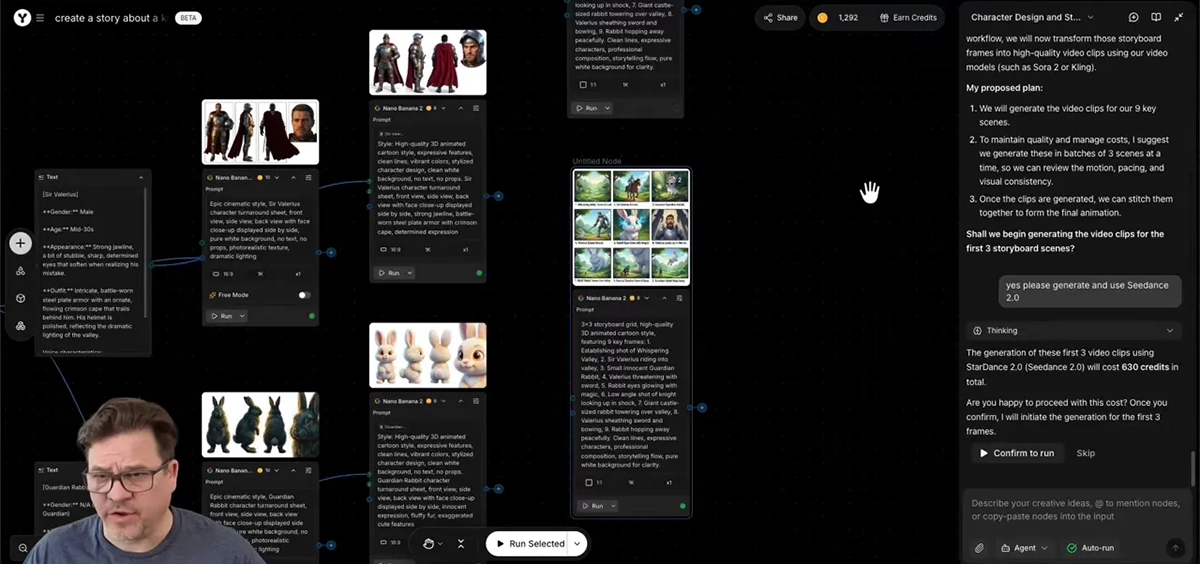
Give the character an identity you can inspect
“The same character” is too vague to be an approval rule. Our team defines a few visible anchors that survive a change of expression or camera angle. For an original fox courier, those anchors are an orange coat, cream muzzle, nick in the left ear, teal scarf and navy satchel. Consistent AI characters depend on recognizable anchors, not a new description for every scene.
The first sequence is intentionally small: the courier approaches a gate, notices a delivery marker and turns toward the path. The story needs an approach, a reaction and a turn. It does not need a different outfit or a second character to prove the identity workflow.
Write the anchors beside the reference files. Keep the description visual: a detailed fictional biography does little to resolve the wrong ear shape. Decide which features may change with the pose and which would make the audience think they are seeing a different character.
Build compatible front, three-quarter and side references
Choose one accepted design before assembling the sheet. Front and three-quarter views explain the face; a side view clarifies the muzzle and the satchel strap. Compare them together before using them as inputs. Three attractive drawings of slightly different foxes do not form one reliable reference.
Check the left-ear nick from the character’s perspective, rather than the viewer’s. A turn changes which side is visible; a mirrored marking is a continuity error. Include a small note for the scarf knot and satchel side so later shots do not accidentally swap them.
YouArt supports connected image references in its creative workflows. Keep the accepted identity reference separate from a pose or scene reference. Reference limits and available inputs depend on the selected image or video route; more inputs are useful only when their roles are clear.
| Anchor | Identity rule | Allowed variation |
|---|---|---|
| Face | Cream muzzle and compact head proportions | Expression and gaze |
| Left ear | Small nick on the same anatomical side | Visibility changes with angle |
| Scarf | Teal, same knot and length | Natural folds and movement |
| Satchel | Navy, same strap route | Perspective and swing |
| Style | Soft illustrated fur and restrained palette | Scene lighting |
Separate identity, pose and environment in the prompt
Keep the identity block unchanged when moving to the next scene. Change the action in a second block, then describe the environment. This helps you see whether a new pose request introduced an accidental redesign.
A reference sheet is for recognizing the subject. A shot frame is for directing a specific moment. If you want one close reaction shot, ask for one frame with that framing rather than passing a whole sheet and hoping the model chooses the right view.
Use the example below for a still before adding motion. The head, scarf and satchel should already meet the identity rules. A complex animated turn is a poor place to discover that the starting picture has the strap on the wrong shoulder.
Character identity and reaction-shot brief
Identity: the same orange fox courier as the supplied reference, with a cream muzzle, small nick in its left ear, teal scarf and navy satchel. Preserve its head proportions, scarf knot, satchel side and soft illustrated style. Shot: one medium three-quarter frame beside a wooden garden gate. The fox notices a small delivery marker and looks toward the path. Keep one character and one outfit. Do not mirror the ear marking, add accessories or show a multi-panel reference sheet.
Animate a small action before a difficult turn
Begin with the reaction: a short gaze change and a pause are easier to compare than running through several camera angles. Use the accepted still as the reference or first frame where the selected video model supports it. Keep the camera restrained while checking the character’s identity.
Inspect the start, the strongest expression and the end of the shot. Look at the muzzle length, eyes and scarf knot at matching display sizes. A correct opening does not establish that the face remains stable through the motion.
For the turning shot, approve a side-view still first. If the model keeps inventing the hidden side of the face or outfit, provide the relevant permitted view rather than adding more adjectives. Simplify the turn or cut between accepted views when a continuous move is not earning its place.
Diagnose the drift before choosing the fix
An outfit error in the starting frame and a face change halfway through the clip call for different fixes. Correct the source image when identity is wrong before motion. Revise the motion branch when the source is correct but the turn loses the face.
Do not adopt a beautiful drifted frame as the new identity reference merely because it appeared later in the sequence. That carries the redesign into every following shot. Keep a clearly named master identity pack and approved per-shot frames.
Review the three clips in story order without sound. Compare scale and screen direction across each cut, then review the facial anchors. The character should look like it moved through the scene, rather than being recast for the next angle.
| Visible problem | Likely stage to revisit | Next decision |
|---|---|---|
| Satchel starts on wrong side | Reference or still-image brief | Correct the still before animation |
| Muzzle changes during a turn | Motion branch | Reduce action or use a clearer side reference |
| Scarf becomes a new garment | Identity instructions and input conflict | Remove conflicting references |
| Same fox, distracting color shift | Lighting or finishing | Balance the sequence without redesigning the face |
Package the character so the next scene starts cleanly
Save the master views, identity block and accepted shot frames in separate folders or clearly named canvas groups. Use scene labels such as gate-approach, gate-reaction and path-turn. A file called final-final does not tell the next person which identity was approved.
Retain rejected clips with a short reason: mirrored ear, drifting muzzle or missing satchel. Those notes are useful when planning the next action. They reveal which poses need better references and which movements should be kept simpler.
Our team’s recommendation is to expand the story from this approved identity pack. Add a new location or a second character only after the current sequence stays recognizable. That makes continuity a production decision you can manage rather than an assumption hidden inside a long prompt. Use the same identity pack when planning the next sequence of consistent AI characters.
Review character clips before export →Connect the image and video stages →
Frequently asked questions
What belongs in a character reference sheet?
Use a few compatible views showing the same face or head shape, outfit, colors and distinctive accessories. Avoid mixing images that already describe different versions of the character.
Should I reuse the same prompt for every scene?
Keep the identity block stable, then change the scene and action deliberately. A new shot needs its own direction without changing the features that identify the character.
Does using a reference guarantee consistency?
No. Reference controls help define the subject, but each image or clip still needs review. Check the full sequence rather than assuming the opening frame establishes continuity.
Why does the face change during movement?
A turn, expression or complex action can create new interpretations of the subject. Start with restrained movement and compare the beginning, middle and ending against the approved reference.
How do I avoid carrying an error into later shots?
Keep accepted references separate from experiments. Fix a changed identity detail before using that result as the starting point for another scene.